 Jump to content
 EN
EN
Winter Major Rankings II 2026
1/9
War 2026
2/9
Summer Festival 2026
3/9
Tanki Online V-LOG: Episode 553
4/9
Railgun RetroFuture
5/9
«Cybertank 2026» Mini-game
6/9
Invite a friend #7
7/9
New English Instagram Account ‼️
8/9
Tanki Classic mass test
9/9


Winter Major Rankings II 2026

Winter Major Rankings I 2026 is finished so we are ready to announce the second ranking tournament of the Winter season!
If you’re still unsure whether to participate in tournaments or not, then now is the time to decide! After all, as we said earlier, the eSport format is designed to simplify participation in eSports, which means that everyone has a chance to compete for impressive in-game rewards and even for real cash rewards.
Who knows, perhaps it will be you and your team that will achieve the highest results.
We also want to remind you that in order to simplify the search for players and teams, we have updated our eSports website and added a special section in which teams search for players, and players search for teams.
Tournament rules
- Ranks: First Sergeant — Legend
- The team consists of 7 players.
- In battle – 5 tankers from each team.
- Your garage doesn’t matter as battles are played in Sport mode.
- On the battlefield, in each team, hulls and turrets should not be repeated. For example, if you use Hornet and Ricochet, no one else from your team should be in the battle with Ricochet or Hornet.
- More detailed rules can be found on the tournament page on the eSports portal.
Prizes
- Unique «Prism» paint
- 96,000 Rubies
- 88,000,000 crystals
- 2,835 epic keys
- 1,071 days of «Premium Pass»
- TMR points
Tournament dates
- Tournament registration will last from 13:00 UTC on August 12th till 17:00 UTC on August 28th.
- The first match will start on August 29th.
- The tournament will end before September 24th.
- The transfer is open and will last until 17:00 UTC on August 28th.
The tournament will be attended by 32 to 128 teams.
Almost immediately after the second rating tournament, we will announce the third one and after all the rating tournaments there will be a Major one. In the Major tournament, they will fight not only for in-game rewards, but also for real cash.
Go to the eSports portal, create your team, read the rules, register and get ready for the next rating tournament! And if you have any questions, visit our eSports Discord server, they will definitely help you.
See you on the battlefields and eSports broadcasts!
War 2026
Tankers, we are once again launching the legendary “War” event from the Tanki Online universe.
This time, we’ve added a new mechanic — double the number of stars with the “Booster”.
“War” is a three-faction conflict to capture territories on the game map. Become a participant, earn stars, and vote daily for the directions of attacks and defenses of territories on a special website.
Event dates: August 14th, 2 AM UTC — September 3rd, 2 AM UTC.
How to Participate?
You can participate in the event starting from the rank of Master Sergeant (8).
To participate, you must purchase the special “Escalation” offer available in the in-game Shop.

After purchasing this special offer, you will become an event participant, your stars will start counting, and you will be assigned to one of the three factions:
Wolves

Lions
Bears
You can check your faction on the event website after purchasing the special offer. Faction changes are not allowed.
What to do next?
After you become an event participant, we automatically start counting the number of stars you earn from that moment onward. Stars are used to choose which territory your faction will attack and which territory it will defend.
Stars earned before purchasing the special offer are not counted.
Each day in the game marks a new phase. The first phase begins on August 14th at 2 AM UTC. Each phase ends at 6 AM UTC the following day. During this time, we stop counting stars and close voting to perform calculations and show how the situation on the War map has changed.
The second and subsequent phases begin around 7 AM UTC. At the start of a new phase, stars are reset. Only new stars earned from the beginning of the next phase on the game’s website will count toward the next phase.
To vote, you must earn at least 5 stars during a phase. Once you have 5 stars, you can go to the event website and cast your vote.
How to Vote for Territories?
The event website features a map of the fictional world of Tanki Online. The map consists of 69 territories, each named after in-game maps. Each faction starts its journey from its capital. This is the only territory that is initially captured by the faction.
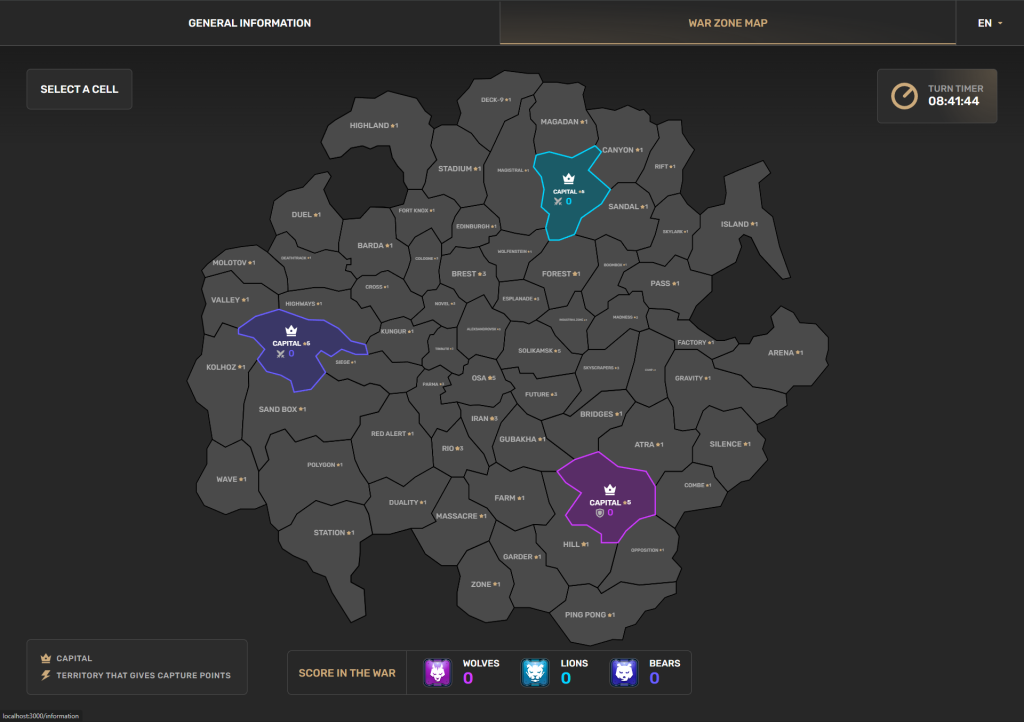
Each phase, a player must cast two votes: one vote for a territory their faction should attack, and one vote for a territory their faction should defend.
You can only vote to defend a territory that belongs to your faction. This means that in the first phase, you can only vote to defend your capital. In subsequent phases, your faction will capture other territories, giving you more options for which territory to defend.
You can only vote to attack a territory that shares a border with a territory already captured by your faction. This means that on the first phase, you can choose any territory that borders your capital, as your capital is the only territory your faction will control at that point. In the next phase, you will have captured several territories and will be able to vote to attack territories that border those captured in the first phase.
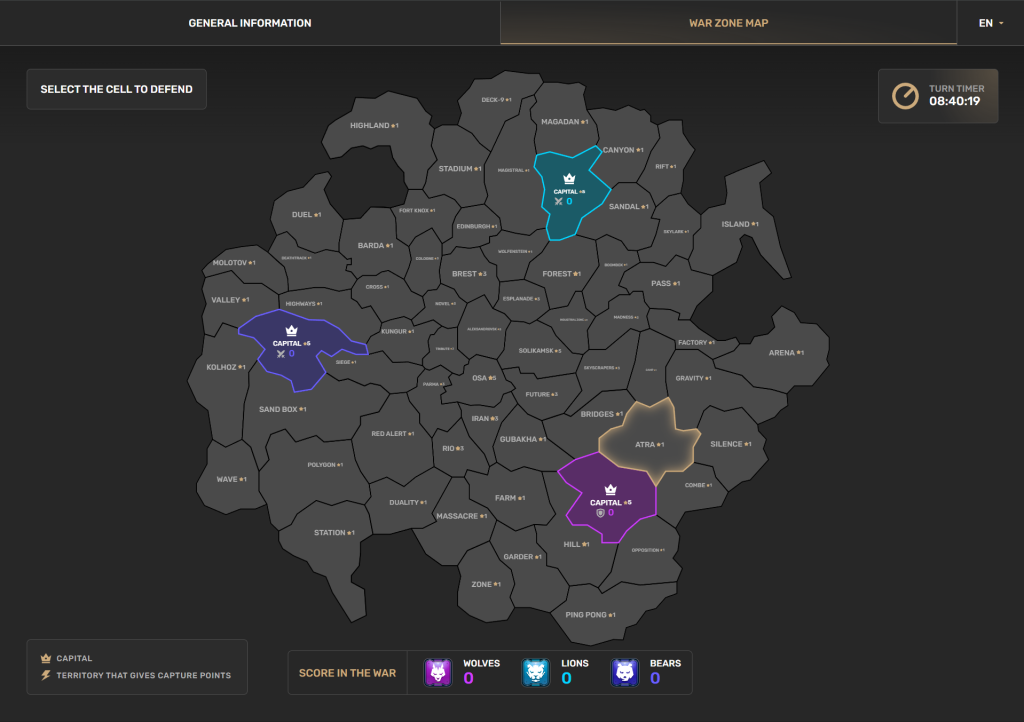
On the event website, select the territory you want to attack and the territory you want to defend. Then confirm your vote. From the moment you confirm your vote, all the stars you have earned in that phase are allocated to the attack and defense of the territories you selected.
For example, if you have earned 20 stars and voted to attack territory A and defend territory B, then 20 stars will be allocated to the attack on territory A, and those same 20 stars will be allocated to the defense of territory B.
If you earn more stars after you have already voted, you need to reopen the website (or refresh the page if it’s already open) for the new stars to be added to your vote.
How to double the number of your stars?

Booster
“Booster” is available on the event website. This is a special offer that can be purchased each game day of the event. The “Booster” doubles the number of stars a player has earned for voting. The Booster’s effect expires at the end of the game day in which it was purchased.
Booster costs 100 Rubies.
You can purchase Booster at any time during the event’s game day. If you have purchased Booster by the end of the game day, your stars for this game day will be counted twice.
How is a Territory Captured?
When a phase ends, we calculate how many stars were allocated to the attack and defense of each territory.
If a territory is unclaimed and only your faction is attacking it, your faction will capture it.
If a territory is unclaimed and multiple factions are attacking it, it is captured by the faction that allocated the most stars to its attack.
If a territory is captured by another faction and is being attacked by others, we compare the number of stars allocated to the attack by each attacking faction with the number of stars allocated to its defense by the owning faction. If at least one attacking faction allocated more stars to the attack than were allocated to its defense, the territory is captured by the attacking faction that allocated the most stars to the attack. If more stars were allocated to its defense, the territory remains with the faction that currently owns it.
If two factions attack a territory owned by a third, and both attacking factions allocated an identical number of stars to the attack, a number which is also greater than the stars allocated to its defense by the owning faction, then the territory becomes neutral (unclaimed).
How to Earn Points?
At the end of each phase, we award points to your faction for the territories it controls based on the results of this phase.
If your faction lost a territory during the phase, it does not receive points for that territory at the end of that phase. If your faction won a territory during the phase, it does receive points for that territory at the end of that phase.
- Capitals and the three central territories (Aleksandrovsk, Solikamsk, Osa) are worth 5 points each.
- 12 territories adjacent to the central ones (Cologne, Brest, Esplanade, Industrial Zone, Madness, Skyscrapers, Future, Iran, Rio, Parma, Tribute, Novel) are worth 3 points each.
- 3 warehouse territories elsewhere on the map (Chernobyl, Monte Carlo, Desert) also give 3 points each.
- All other territories are worth 1 point each, unless otherwise announced by the event organizers.
The last phase ends on September 3rd, 6 AM UTC.
How to Receive Prizes?
Participation Prizes
At the end of each phase, if you have been active enough, you will receive prizes.
All rewards are cumulative.
If you voted during the phase and earned 10 stars in that phase, you receive:
×1
COMMON KEY
If you had a Premium Pass at the time of the calculation, you additionally receive:
×1
COMMON KEY
If you had a Battle Pass at the time of the calculation, you additionally receive:
×1
COMMON KEY
If you had an Elite Pass at the time of the calculation, you additionally receive:
×1
COMMON KEY
So, if you earned 10 stars and have Premium Pass, Battle Pass, and Elite Pass, you will receive a total of 4 Common Keys.
If your star count then reached 30 stars, you additionally receive:

×2
RARE KEY
For having Premium Pass, Battle Pass, and Elite Pass, for each pass you additionally receive:
×1
RARE KEY
So, if you earned 30 stars and have Premium Pass, Battle Pass, and Elite Pass, you will receive a total of 4 Common Keys and 5 Rare Keys.
If your star count then reached 50 stars, you additionally receive:

×3
EPIC KEY
For having Premium Pass, Battle Pass, and Elite Pass, for each pass you additionally receive:
×1
EPIC KEY
So, if you earned 50 stars and have Premium Pass, Battle Pass, and Elite Pass, you will receive a total of 4 Common Keys, 5 Rare Keys and 6 Epic Keys.
All rewards are cumulative. At the end of each phase, you can receive a maximum of 4 Common Keys, 5 Rare Keys, and 6 Epic Keys.
Each bonus for Premium Pass, Battle Pass, and Elite Pass applies independently. For example, if you don’t have Premium Pass but have Battle Pass, you will receive the additional reward for Battle Pass.
Warehouse Prizes
There are 3 warehouse territories (Chernobyl, Monte Carlo, Desert) with a secret treasure on the global War map. However, only one faction, the first to reach the treasure, will be able to claim it!
This is a chance for your faction to obtain valuable prizes. If you voted to capture the warehouse territory and your faction successfully captures it, you will receive:
×1
LEGENDARY Key
Basic reward
×5
EPIC Key
If you have Battle Pass
×5
EPIC Key
If you have Elite Pass
×5
EPIC Key
If you have Premium Pass
You will NOT receive the standard prizes for the stars you earned.
If your faction captured the warehouse territory, but you did not vote to capture it, you will only receive the standard prizes.
If you voted to capture the warehouse territory, but your faction failed to capture it, you will receive no prizes for this phase (you also will not receive the standard prizes for stars).
All prizes are credited to your Prize Vault at the end of the phase. To receive a prize on your in-game account, go to your Vault and click on the “Claim” button.
Important Features:
- To receive the reward for capturing the treasure (if your faction captured a warehouse territory), you must have contributed at least 10 stars in your vote to capture this territory.
- Owning the warehouse territory grants 3 points.
- Rewards can only be obtained for the first capture of a warehouse. Once the warehouse territory with the treasure is captured, it becomes a regular territory.
- Points scoring for this phase works the same as for all other phases.
Victory Prizes
The faction that has scored the highest number of points at the end of the War will be declared the winner. However, all participants will receive an additional reward based on their faction’s final ranking.
First Place
×1
LEGENDARY KEY
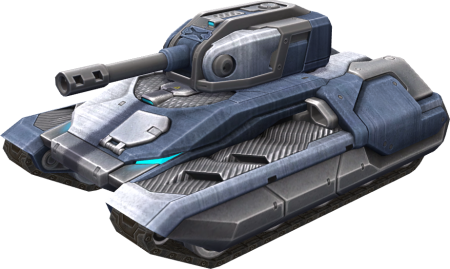
PAINT
WAR WINNER
The “War Winner” paint will remain in the Garages of those who have earned it, until the next war with a map-voting system;
Second Place
×15
EPIC KEY
Third Place
×15
COMMON KEY
Prize Vault
All prizes are credited to your Prize Vault. To transfer a prize to your in-game account, go to the vault and click the “Claim” button.
The vault will be accessible until September 11th, 2 AM UTC. Any rewards not claimed before the vault closes will be annulled and not compensated.
Coordination
We have created special sections on the forum and in our Discord servers where you can discuss tactics with other members of your faction. Please note that your messages are visible to all players.
Forum
Discord
Questions and Answers
Q: How do I become a participant?
A: Purchase the special “Escalation” offer, earn 50 stars each phase to get the maximum rewards, and be sure to vote on the event website for the territory to attack and the territory to defend.
Q: Why can’t I vote?
A: To vote, you need to be an event participant. You can become a participant from the rank of Master Sergeant (8). To become a participant, you need to purchase the special “Escalation” offer. To vote, you need to earn at least 5 stars during a phase. Stars are only counted from the moment you become an event participant. You can only vote during a phase; a phase ends at 6 AM UTC, after which you cannot vote while calculation is in progress. After calculation, the site reopens and you can vote again.
Q: How do I find out my faction?
A: You can see your faction on the event website.
Q: How do I know which territory is best to attack and which to defend?
A: We have created special sections on the game Forum and in our Discord servers where you can discuss tactics with other participants of your faction.
Q: If I have 10 stars and I choose a territory to attack and a territory to defend, will half go to attack and half to defense?
A: No. If you have 10 stars, then when voting, 10 stars will be added to the attack and 10 stars will be added to the defense. The number of stars in your balance will be allocated to the attack, and the same amount will be allocated to the defense.
Q: If I received the reward for 30 stars, will I get the reward for 10 stars? Do I only get the reward for the highest number of stars?
A: All rewards are cumulative. If you earned 30 stars, you will receive the rewards for 10 stars and for 30 stars. If you earned 50 stars, you will receive the rewards for 10, 30, and 50 stars.
Q: Which phase are the stars I earned during the calculation period counted in favor of?
A: Only stars earned before 6 AM UTC are counted for the previous phase. Only stars earned after the start of the new phase on the event website are counted for the new phase. Stars earned in the period between these two moments are not counted.
Q: What happens if a faction loses all its territories?
A: The faction will no longer be able to capture territories or earn points.
Q: What is “Booster” and how does it work?
A: The “Booster” is a special offer that doubles the number of stars you have earned for voting during the current game day. Booster only works on the day it was purchased, and its effect expires when the game day ends (at 6 AM UTC). Booster costs 100 Rubies.
Q: When is the best time to purchase “Booster”?
A: You can buy Booster at any time during the game day before it ends. If you buy Booster before earning any stars, all stars earned that day will be doubled. If you earn stars first and then buy the Booster, they will also be doubled. Booster applies to the total number of stars earned during the current turn.
Q: Can I buy “Booster” multiple times in one day?
A: No, Booster can only be purchased once per day. The doubling effect applies to all stars earned during that game day, regardless of when you made the purchase.
Q: If I buy “Booster” and then earn more stars, will they be doubled?
A: Yes. All stars earned during the game day while Booster is active will be doubled, whether you earned them before or after purchasing Booster. The key condition is that Booster must be purchased before the game day ends (before 6 AM UTC).
Q: Do I need to vote again after buying the “Booster”?
A: No. If you have already voted and then purchase Booster, your voted stars will automatically be doubled after you refresh the event website page. We recommend refreshing the page to see the updated number of stars allocated to attack and defense.
Q: Do I need to buy “Booster” every day?
A: Yes, Booster only lasts for one game day. To double your stars on each subsequent turn, you will need to purchase Booster again every day of the event.
Q: Can I activate “Booster” automatically for all days of the event?
A: No, the Booster must be purchased manually for each game day separately. There is no automatic renewal or subscription for Booster.
The event is designed only as an entertaining, fictional activity, and has no connection to real names, people, organizations, and events in the world. Any similarities are coincidental. The event does not, in any way, provoke or encourage real life violence, extremism, or violation of international laws. The company is not responsible for any actions that harm the user or break international laws and/or Game Rules. For breaking the rules of the game or the event, participants can be disqualified from the event and its rewards.
The event is held by APL Publishing Ltd., in accordance with the General Rules for Promotions and Contests.
Summer Festival 2026

Once again, we are starting our bright and colorful Summer Festival!
Get ready for a blast of fun during the upcoming hot days in Tanki! When else can you take part in a real tomato war with other players?! And that’s just the beginning! The “La Tomatina” special mode, 30% discounts, GT and XT skins, augments for Hammer and Crusader in Epic Containers, a brand new Elite Pass featuring a Legendary Key and the “Nemesis” augment for Gauss, green apple Gold Boxes, and tons of missions will be waiting for you!
One thing can be said for sure — you won’t get bored!
Event dates: from August 7th, 2 AM UTC till September 4th, 2 AM UTC.
Discounts
Take advantage of the great discounts from August 7th to August 10th.
All discounts start and end with the server restart at 2 AM UTC.
For 3 whole days, you will be able to obtain the following items with a 30% discount:
-30%
SHOP (07.08 — 10.08)
Crystals

Stars

Early Access items

Premium Pass

-30%
GARAGE (07.08 — 10.08)
Augments

Supplies

Paints

Modules

Drones

Grenades

-30%
Upgrades (07.08 — 10.08)
Special Modes
The special “La Tomatina” game mode is waiting for you!
Important: Boosted battle funds and experience are only active within the festive weekend game modes.
Each mode starts and ends with the server restart at 2 AM UTC.
SPECIAL MODE
LA TOMATINA
August 7th — August 10th
Mode
DM
Map
Sandbox REMASTERED
Turret
Tomato Boy
Hull
Any
Bonus Boxes
Upgrades
Augments
Gold Boxes
Equipment Change
Overdrives
Supplies
Nuclear Energy
Smart Supplies
Drones
Protection Modules
Groups
Grenades
More Gold Boxes
A new special «La Tomatina» mode with tomato throwing 🍅 and increased gold box falling frequency awaits you!
SPECIAL MODE
LA TOMATINA
August 14th — August 17th
Mode
DM
Map
Sandal REMASTERED
Turret
Tomato Boy
Hull
Any
Bonus Boxes
Upgrades
Augments
Gold Boxes
Equipment Change
Overdrives
Supplies
Nuclear Energy
Smart Supplies
Drones
Protection Modules
Groups
Grenades
More Gold Boxes
A new special «La Tomatina» mode with tomato throwing 🍅 and increased gold box falling frequency awaits you!
SPECIAL MODE
LA TOMATINA
August 21st — August 24th
Mode
DM
Map
Highland Remaster
Turret
Tomato Boy
Hull
Any
Bonus Boxes
Upgrades
Augments
Gold Boxes
Equipment Change
Overdrives
Supplies
Nuclear Energy
Smart Supplies
Drones
Protection Modules
Groups
Grenades
More Gold Boxes
A new special «La Tomatina» mode with tomato throwing 🍅 and increased gold box falling frequency awaits you!
SPECIAL MODE
LA TOMATINA
August 28th — August 31st
Mode
DM
Map
Parma Remaster
Turret
Tomato Boy
Hull
Any
Bonus Boxes
Upgrades
Augments
Gold Boxes
Equipment Change
Overdrives
Supplies
Nuclear Energy
Smart Supplies
Drones
Protection Modules
Groups
Grenades
More Gold Boxes
A new special «La Tomatina» mode with tomato throwing 🍅 and increased gold box falling frequency awaits you!
Special Offers
Hurry to grab great deals at awesome prices!
August 7th — August 31st:

August 7th — September 4th:
Daily Ruby Pass

×500
Tankoins*

×4500
Rubies**
* 500 Tankoins instantly.
** For 30 days, each day the player can access a pre-completed mission upon logging in, from which they can claim a reward of 150 Rubies.
Note: One-time purchase
** For 30 days, each day the player can access a pre-completed mission upon logging in, from which they can claim a reward of 150 Rubies.
Note: One-time purchase
Purchase
Minimum Requirements
×15
EPIC KEY

×1
NUCLEAR energy

×3
Premium Pass

August 14th — September 4th:
August 21st — September 4th:

August 28th — September 4th:
Epic Containers

Treat yourself with the updated content of Epic Containers!
- SKIN Hammer GT
- SKIN Crusader XT
- “Blunderbuss” augment for Hammer
- “Revolver” augment for Hammer
- “Excelsior” augment for Hammer
- “Lifeguard” augment for Crusader
- “Excelsior” augment for Crusader
- And everything you can get from Common Containers
Special Missions
We’ve prepared a large list of missions where everyone can find something for themselves!
Your progress in completing missions is only counted from the moment you first enter the “Missions” screen after the event begins.
Missions follow the Encore system, with the second set of missions appearing only after the first set is completed.
SPECIAL
Part 1. August 7th — August 14th
Part 2. August 14th — August 21st
Part 3. August 21st — August 28th
Part 4. August 28th — September 4th
FIRST TOMATO WAR
TASK
Finish 2 battles in the festive mode.
REWARD
×3
EPIC KEY
EPIC KEY
SECOND TOMATO WAR
TASK
Finish 2 battles in the festive mode.
REWARD
×3
EPIC KEY
EPIC KEY
THIRD TOMATO WAR
TASK
Finish 2 battles in the festive mode.
REWARD
×3
EPIC KEY
EPIC KEY
FOURTH TOMATO WAR
TASK
Finish 2 battles in the festive mode.
REWARD
×3
EPIC KEY
EPIC KEY
SET 1
Set 1. August 7th — September 4th
SUPERMISSION: SIESTA! PART 1
TASK
Complete «Welcome! Part 1», «Among Their Own Kind. Part 1», «Choice Without a Choice. Part 1», «Serenity. Part 1», «Team Player. Part 1», «Summer Shopping. Part 1», «Freshen Up!», «Proficient Way», «Playing Ahead» and «Scorched Earth» missions.
REWARD
×5
EPIC KEY
EPIC KEY
×1
RARE KEY
RARE KEY

×1000
EXPERIENCE POINTS
EXPERIENCE POINTS
WELCOME! PART 1
TASK
Enter the game at least once.
REWARD

×1
COMMON KEY
COMMON KEY
×100
EXPERIENCE POINTS
EXPERIENCE POINTS
AMONG THEIR OWN KIND. PART 1
TASK
Earn 5000 reputation points in matchmaking battles.
REWARD
×1
COMMON KEY
COMMON KEY
×100
EXPERIENCE POINTS
EXPERIENCE POINTS
CHOICE WITHOUT A CHOICE. PART 1
TASK
Earn 3000 reputation points in Quick Battle mode in matchmaking battles.
REWARD
×1
COMMON KEY
COMMON KEY
×100
EXPERIENCE POINTS
EXPERIENCE POINTS
SERENITY. PART 1
TASK
Finish 10 battles in matchmaking battles.
REWARD
×1
COMMON KEY
COMMON KEY
×100
EXPERIENCE POINTS
EXPERIENCE POINTS
TEAM PLAYER. PART 1
TASK
Be in the winning team of 2 battles in matchmaking battles.
REWARD
×1
COMMON KEY
COMMON KEY
×100
EXPERIENCE POINTS
EXPERIENCE POINTS
SUMMER SHOPPING. PART 1
TASK
Make any purchase in the game’s Shop.
REWARD
×1
COMMON KEY
COMMON KEY
×100
EXPERIENCE POINTS
EXPERIENCE POINTS
FRESHEN UP!
TASK
Use repair kit 150 times in matchmaking battles.
REWARD
×1
COMMON KEY
COMMON KEY
×100
EXPERIENCE POINTS
EXPERIENCE POINTS
PROFICIENT WAY
TASK
Earn 3000 experience points in matchmaking battles.
REWARD
×1
COMMON KEY
COMMON KEY
×100
EXPERIENCE POINTS
EXPERIENCE POINTS
PLAYING AHEAD
TASK
Destroy 1 tank using grenades in matchmaking battles.
REWARD
×1
COMMON KEY
COMMON KEY
×100
EXPERIENCE POINTS
EXPERIENCE POINTS
SCORCHED EARTH
TASK
Deal 100000 damage in matchmaking battles.
REWARD
×1
COMMON KEY
COMMON KEY
×100
EXPERIENCE POINTS
EXPERIENCE POINTS
SET 2
Set 2. August 14th — September 4th
SUPERMISSION: SIESTA! PART 2
TASK
Complete «Welcome! Part 2», «Among Their Own Kind. Part 2», «Choice Without a Choice. Part 2», «Serenity. Part 2», «Team Player. Part 2», «Summer Shopping. Part 2», «Unjustified Cruelty», «Meteor Shower», «Sun Stroke» and «Explosive Party!» missions.
REWARD
×5
EPIC KEY
EPIC KEY
×1
RARE KEY
RARE KEY
×1000
EXPERIENCE POINTS
EXPERIENCE POINTS
WELCOME! PART 2
TASK
Enter the game at least once.
REWARD
×1
COMMON KEY
COMMON KEY
×100
EXPERIENCE POINTS
EXPERIENCE POINTS
AMONG THEIR OWN KIND. PART 2
TASK
Earn 5000 reputation points in matchmaking battles.
REWARD
×1
COMMON KEY
COMMON KEY
×100
EXPERIENCE POINTS
EXPERIENCE POINTS
CHOICE WITHOUT A CHOICE. PART 2
TASK
Earn 3000 reputation points in Quick Battle mode in matchmaking battles.
REWARD
×1
COMMON KEY
COMMON KEY
×100
EXPERIENCE POINTS
EXPERIENCE POINTS
SERENITY. PART 2
TASK
Finish 10 battles in matchmaking battles.
REWARD
×1
COMMON KEY
COMMON KEY
×100
EXPERIENCE POINTS
EXPERIENCE POINTS
TEAM PLAYER. PART 2
TASK
Be in the winning team of 2 battles in matchmaking battles.
REWARD
×1
COMMON KEY
COMMON KEY
×100
EXPERIENCE POINTS
EXPERIENCE POINTS
SUMMER SHOPPING. PART 2
TASK
Make any purchase in the game’s Shop.
REWARD
×1
COMMON KEY
COMMON KEY
×100
EXPERIENCE POINTS
EXPERIENCE POINTS
UNJUSTIFIED CRUELTY
TASK
Use boosted damage 150 times in matchmaking battles.
REWARD
×1
COMMON KEY
COMMON KEY
×100
EXPERIENCE POINTS
EXPERIENCE POINTS
METEOR SHOWER
TASK
Earn 45 stars in matchmaking battles.
REWARD
×1
COMMON KEY
COMMON KEY
×100
EXPERIENCE POINTS
EXPERIENCE POINTS
SUN STROKE
TASK
Destroy 10 tanks using critical damage in matchmaking battles.
REWARD
×1
COMMON KEY
COMMON KEY
×100
EXPERIENCE POINTS
EXPERIENCE POINTS
EXPLOSIVE PARTY!
TASK
Use any grenade 10 times in matchmaking battles.
REWARD
×1
COMMON KEY
COMMON KEY
×100
EXPERIENCE POINTS
EXPERIENCE POINTS
SET 3
Set 3. August 21st — September 4th
SUPERMISSION: SIESTA! PART 3
TASK
Complete «Welcome! Part 3», «Among Their Own Kind. Part 3», «Choice Without a Choice. Part 3», «Serenity. Part 3», «Team Player. Part 3», «Summer Shopping. Part 3», «Don’t Look Down», «Virtuoso», «Solar Flare» and «New Discovery!» missions.
REWARD
×5
EPIC KEY
EPIC KEY
×1
RARE KEY
RARE KEY
×1000
EXPERIENCE POINTS
EXPERIENCE POINTS
WELCOME! PART 3
TASK
Enter the game at least once.
REWARD
×1
COMMON KEY
COMMON KEY
×100
EXPERIENCE POINTS
EXPERIENCE POINTS
AMONG THEIR OWN KIND. PART 3
TASK
Earn 5000 reputation points in matchmaking battles.
REWARD
×1
COMMON KEY
COMMON KEY
×100
EXPERIENCE POINTS
EXPERIENCE POINTS
CHOICE WITHOUT A CHOICE. PART 3
TASK
Earn 3000 reputation points in Quick Battle mode in matchmaking battles.
REWARD
×1
COMMON KEY
COMMON KEY
×100
EXPERIENCE POINTS
EXPERIENCE POINTS
SERENITY. PART 3
TASK
Finish 10 battles in matchmaking battles.
REWARD
×1
COMMON KEY
COMMON KEY
×100
EXPERIENCE POINTS
EXPERIENCE POINTS
TEAM PLAYER. PART 3
TASK
Be in the winning team of 2 battles in matchmaking battles.
REWARD
×1
COMMON KEY
COMMON KEY
×100
EXPERIENCE POINTS
EXPERIENCE POINTS
SUMMER SHOPPING. PART 3
TASK
Make any purchase in the game’s Shop.
REWARD
×1
COMMON KEY
COMMON KEY
×100
EXPERIENCE POINTS
EXPERIENCE POINTS
DON’T LOOK DOWN
TASK
Use mines 150 times in matchmaking battles.
REWARD
×1
COMMON KEY
COMMON KEY
×100
EXPERIENCE POINTS
EXPERIENCE POINTS
VIRTUOSO
TASK
Destroy 30 tanks in matchmaking battles.
REWARD
×1
COMMON KEY
COMMON KEY
×100
EXPERIENCE POINTS
EXPERIENCE POINTS
SOLAR FLARE
TASK
Use overdrive 10 times in matchmaking battles.
REWARD
×1
COMMON KEY
COMMON KEY
×100
EXPERIENCE POINTS
EXPERIENCE POINTS
NEW DISCOVERY!
TASK
Open 15 any Containers.
REWARD
×1
COMMON KEY
COMMON KEY
×100
EXPERIENCE POINTS
EXPERIENCE POINTS
SET 4
Set 4. August 28th — September 4th
SUPERMISSION: SIESTA! PART 4
TASK
Complete «Welcome! Part 4», «Among Their Own Kind. Part 4», «Choice Without a Choice. Part 4», «Serenity. Part 4», «Team Player. Part 4», «Summer Shopping. Part 4», «Wind Force», «Ice Shards», «From Dusk till Dawn» and «7 Days» missions.
REWARD
×5
EPIC KEY
EPIC KEY
×1
RARE KEY
RARE KEY
×1000
EXPERIENCE POINTS
EXPERIENCE POINTS
WELCOME! PART 4
TASK
Enter the game at least once.
REWARD
×1
COMMON KEY
COMMON KEY
×100
EXPERIENCE POINTS
EXPERIENCE POINTS
AMONG THEIR OWN KIND. PART 4
TASK
Earn 5000 reputation points in matchmaking battles.
REWARD
×1
COMMON KEY
COMMON KEY
×100
EXPERIENCE POINTS
EXPERIENCE POINTS
CHOICE WITHOUT A CHOICE. PART 4
TASK
Earn 3000 reputation points in Quick Battle mode in matchmaking battles.
REWARD
×1
COMMON KEY
COMMON KEY
×100
EXPERIENCE POINTS
EXPERIENCE POINTS
SERENITY. PART 4
TASK
Finish 10 battles in matchmaking battles.
REWARD
×1
COMMON KEY
COMMON KEY
×100
EXPERIENCE POINTS
EXPERIENCE POINTS
TEAM PLAYER. PART 4
TASK
Be in the winning team of 2 battles in matchmaking battles.
REWARD
×1
COMMON KEY
COMMON KEY
×100
EXPERIENCE POINTS
EXPERIENCE POINTS
SUMMER SHOPPING. PART 4
TASK
Make any purchase in the game’s Shop.
REWARD
×1
COMMON KEY
COMMON KEY
×100
EXPERIENCE POINTS
EXPERIENCE POINTS
WIND FORCE
TASK
Use speed boost 150 times in matchmaking battles.
REWARD
×1
COMMON KEY
COMMON KEY
×100
EXPERIENCE POINTS
EXPERIENCE POINTS
ICE SHARDS
TASK
Earn 4000 crystals in matchmaking battles.
REWARD
×1
COMMON KEY
COMMON KEY
×100
EXPERIENCE POINTS
EXPERIENCE POINTS
FROM DUSK TILL DAWN
TASK
Complete 15 Daily missions.
REWARD
×1
COMMON KEY
COMMON KEY
×100
EXPERIENCE POINTS
EXPERIENCE POINTS
7 DAYS
TASK
Complete 3 Weekly missions.
REWARD
×1
COMMON KEY
COMMON KEY
×100
EXPERIENCE POINTS
EXPERIENCE POINTS
Advent Calendar
We are launching the festive advent calendar for you!
Attention! The Advent Calendar and its missions become available only after purchasing the “Advent Calendar” special offer.
After purchasing the “Advent Calendar” special offer, you will get access to:
- 5 Standard Missions
- 1 Supermission with unique rewards!
All you need to do is log into the game during the event and claim your gifts.
Task: Complete all “One More Day” missions that appear after August 7th.
Completing 5 standard missions will unlock the final Supermission.
Supermission

×1
Recruit Paint
×200
RUBY
Mission
×12
EPIC KEY
×200
RUBY
Elite Pass
The most luxurious pass is here! It consists of 20 levels.
Your goal is to earn stars and unlock new levels, and for each level reached, you will receive additional prizes!
In order to complete the whole pass and reach the main prize, you will need to earn 1000 stars.

Elite Pass
Important: All stars earned during the event will be counted. Progress begins with the start of the event. Stars earned before the purchase of the «Elite Pass» will also be counted. The «Elite Pass» itself is required to claim the prizes. By purchasing it, you will be able to claim all the unlocked prizes to your Garage!
The Main Prizes are Legendary Key ×1 and the “Nemesis” Augment for Gauss!
The price of this «Elite Pass» is 2300 Rubies.
Festive decorations
- Festive paint on drones
- Festive paint
- Festive Gold Box drop zone skin
- Festive loading screen
- Changed billboards
- Green apple Gold Box

Green apple Gold Box
Charge with the tomato drive and apple freshness!
Tanki Online V-LOG: Episode 553
In today’s episode, we will be introducing emotes above tanks. We’ll also be kicking off the Summer Festival and revealing the August wipe date.
Railgun RetroFuture

Add to your collection of unique skins from the “RetroFuture” line!
Tomorrow marks the start of the “CyberTank 2026” mini‑game, which means we’ll not only dive into a futuristic world of technology and scientific achievements, but also begin the hunt for a new rare skin!
The most active players who manage to reach the end of the mini‑game route will receive a unique super prize — the “RetroFuture” skin for Railgun!

Railgun RetroFuture
This skin is the continuation of the «RetroFuture» skin series beloved by many. It attracts the glances of every tanker!
There is a legend that these skins were brought to the planet by a tanker whose spaceship crashed. He managed to escape by reassembling the ship’s debris to make an escape pod. These are called «RetroFuture». You can’t take your eyes off it, can you?
The mini‑game will run for 27 days: from July 24th, 2 AM to August 20th, 2 AM UTC. Don’t miss your chance to become the owner of the new skin!
Good luck in the game!
«Cybertank 2026» Mini-game

We again offer you to join us on our journey through the futuristic world of technologies and scientific achievements! Let’s not allow artificial intelligence to fully conquer our world!
We launch the «Cybertank 2026» mini-game that will last for 27 days: from July 24th, 2 AM UTC till August 20th, 2 AM UTC.
You will need to move between platforms to earn prizes: a paint, grenades, keys (including Legendary), augments, and RF skins, that will give your tank a brutal futuristic look!
To participate in the mini-game you will need to earn energy and use it to make moves.
Energy
Energy
Your tank needs energy to move around the futuristic world.
Energy can be received through the following ways:
- From contracts
- From Gold Boxes
- By completing special missions in Tanki.
You can track your current amount of energy on the event website.
Each turn costs 10 energy.
Contracts

Contracts
Contracts are missions that require you to earn Reputation Points in Matchmaking battles.
Contracts can be purchased from July 24th, 2 AM UTC till August 19th, 2 AM UTC in the Shop for Rubies.
After completing the purchase, you need to enter the «Contracts» section in «Missions» and activate the contract.
There are 3 types of contracts in the mini-game:
Bronze Contract

Condition: Earn 5000 Reputation Points
Reward: Energy ×2; Bronze Contract ×1
Time to complete: until August 19th, 2 AM UTC
Time to collect the prize: until August 19th, 2 AM UTC
Reward: Energy ×2; Bronze Contract ×1
Time to complete: until August 19th, 2 AM UTC
Time to collect the prize: until August 19th, 2 AM UTC
CHECKPOINT #1 REWARD
- Alternative reward if not completed in time: Crystals ×1000
- Alternative reward if the reward is not collected in time: Crystals ×1000
- Early completion: instead of earning points, you may purchase contract early completion. The price of early completion depends on your progress toward completing the contract.
- Early completion price: Rubies ×300-1
Silver Contract

Condition: Earn 4500 Reputation Points
Reward: Energy ×10
Time to complete: until August 19th, 2 AM UTC
Time to collect the prize: until August 19th, 2 AM UTC
Reward: Energy ×10
Time to complete: until August 19th, 2 AM UTC
Time to collect the prize: until August 19th, 2 AM UTC
Price
290 RUBIES
- Alternative reward if not completed in time: Rubies ×290
- Alternative reward if the reward is not collected in time: Rubies ×290
- Early completion: instead of earning points, you may purchase contract early completion. The price of early completion depends on your progress toward completing the contract.
- Early completion price: Rubies ×700-1
Golden Contract
Condition: Earn 3000 Reputation Points
Reward: Energy ×50
Time to complete: until August 19th, 2 AM UTC
Time to collect the prize: until August 19th, 2 AM UTC
Reward: Energy ×50
Time to complete: until August 19th, 2 AM UTC
Time to collect the prize: until August 19th, 2 AM UTC
Price
990 RUBIES
- Alternative reward if not completed in time: Rubies ×990
- Alternative reward if the reward is not collected in time: Rubies ×990
- Early completion: instead of earning points, you may purchase contract early completion. The price of early completion depends on your progress toward completing the contract.
- Early completion price: Rubies ×1000-1
IMPORTANT Information:
- Only one Contract can be activated at a time.
- If you have already completed the Contract conditions and earned the required number of Reputation points, the reward should be collected immediately, otherwise a new Contract cannot be activated.
- After the event is over, you will get an alternative reward for any completed but not claimed Contracts depending on the Contract’s price.
- After August 19th, 2 AM UTC all Contracts will be inactive and expired — they will be highlighted in red.
Before starting on a Contract, DO NOT FORGET to activate it.
Special missions
We prepared several special missions, which by completing you will receive energy.
WEIGHTLESSNESS
TASK
Destroy 100 tanks using light hulls (Wasp, Hornet, Hopper) in any matchmaking battles.
REWARD
×1
EPIC KEY

×12
ENERGY
OPTIMAL BALANCE
TASK
Destroy 100 tanks using medium hulls (Hunter, Viking, Crusader, Paladin, Dictator) in any matchmaking battles.
REWARD
×1
EPIC KEY
×12
ENERGY
TREMORS
TASK
Destroy 100 tanks using heavy hulls (Ares, Titan, Mammoth) in any matchmaking battles.
REWARD
×1
EPIC KEY
×12
ENERGY
WEAK CURRENTS
TASK
Destroy 100 tanks using melee-range turrets (Firebird, Freeze, Isida, Tesla, Hammer) in any matchmaking battles.
REWARD
×1
EPIC KEY
×12
ENERGY
MEDIUM FREQUENCIES
TASK
Destroy 100 tanks using medium-range turrets (Smoky, Striker, Vulcan, Thunder, Twins, Ricochet) in any matchmaking battles.
REWARD
×1
EPIC KEY
×12
ENERGY
A SHOT INTO THE VOID
TASK
Destroy 100 tanks using long-range turrets (Shaft, Gauss, Magnum, Railgun, Scorpion, Tsunami) in any matchmaking battles.
REWARD
×1
EPIC KEY
×12
ENERGY
Game mechanics
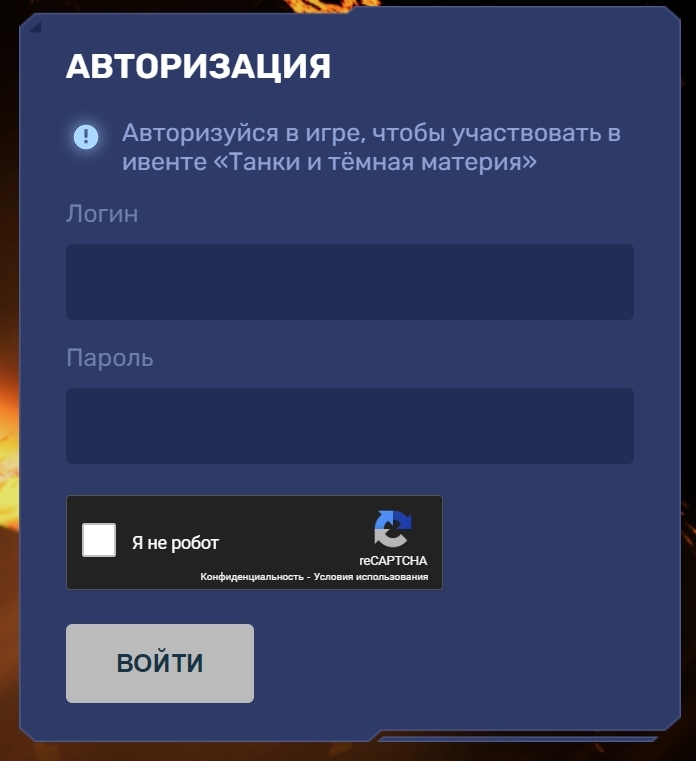
Log in
To start playing, you need to log in to the special mini-game website, using the nickname and password of your in-game account.
If you are registered in the game using social networks or partner platforms and thus don’t have a password for your account, you need to contact the Tech Support to get a password.
Platforms & Glitches
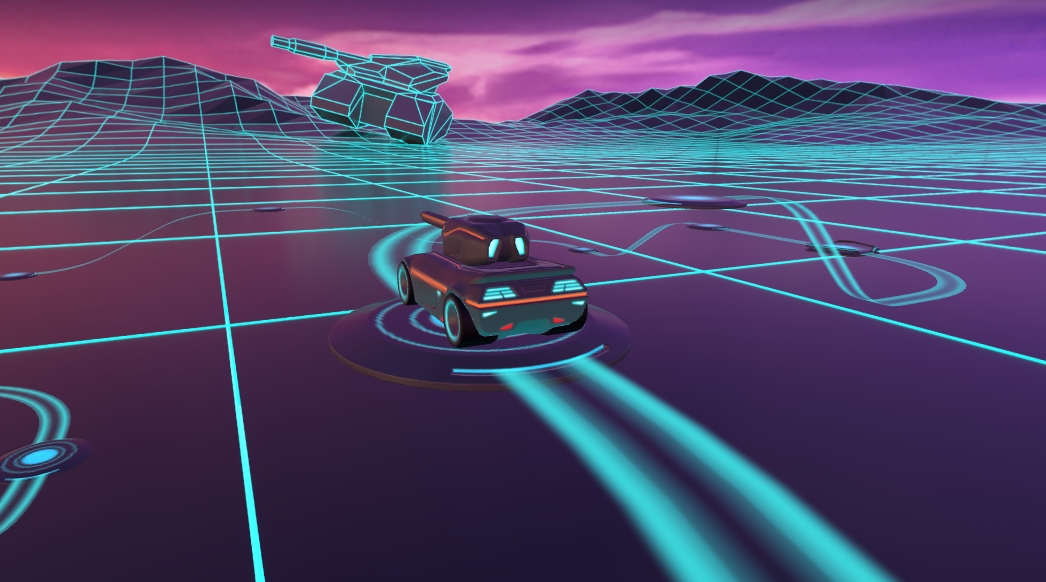
Platforms & Glitches
Then, a futuristic world made out of innovative platforms will appear before you.
To make a move, you will need to roll the dice. On each move, you can progress one or two steps forward. On each lap there will be a different amount of glitches. Landing on them can throw you two steps back.
The location, amount of traps, and the map are the same for every player.
Important: the «glitch» platform throws you back only once. Landing on the same platform will never push you back again.
Every platform has a reward linked to it. This way you get a new prize for every passed platform. Your prizes will be kept in a special vault. They can be received by reaching a checkpoint.
Checkpoints
Checkpoints are stations where the collected prizes will be sent to your Tanki account. Moreover, reaching checkpoints themselves also grants special prizes:
Checkpoint 1

PAINT
Miami Beach
Checkpoint 2
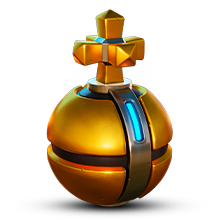
×10
Tsar Grenade
Checkpoint 3

Vulcan
Pulsar
Checkpoint 4
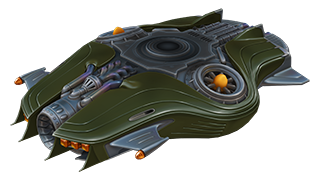
CRUSADER
RT
Checkpoint 5

Tsunami
Triplet Firing Mode
Checkpoint 6
×1
LEGENDARY Key
Checkpoint 7

Railgun
RT
Tsunami’s «”Triplet” Firing Mode» augment
Turret fires three shots in a row instead of two.
Integration of a special rammer that uses the energy of both cannons’ recoil. With its help, the first cannon has enough time to reload while the second one fires.
Detailed information about the new augments can be read on our Wiki.
Checkpoints not only give you the opportunity to claim your rewards but also save your current progress in the mini-game: even a “glitch” cannot pull you back further than your last checkpoint.
Collect energy, throw the dice, move through the platforms, reach checkpoints, and receive great prizes!
Invite a friend #7

Invite friends to the game and get rewards!
We are launching a new referral event! During this event, you can get rewards for inviting new players or players who stopped playing the game. Also, as the friends you’ve invited complete special missions, you will receive additional bonuses!
Dates: From July 10th 2 AM to August 19th 2 AM UTC
Let’s get into the details:
How to invite
IMPORTANT: The option to invite new players is only available to accounts created before the start of the event, July 10th 2 AM.
Referrals are players who you invited to the game.
You need to follow these steps to make a new player your referral:
STEP 1 Your rank should be at least Master Sergeant.
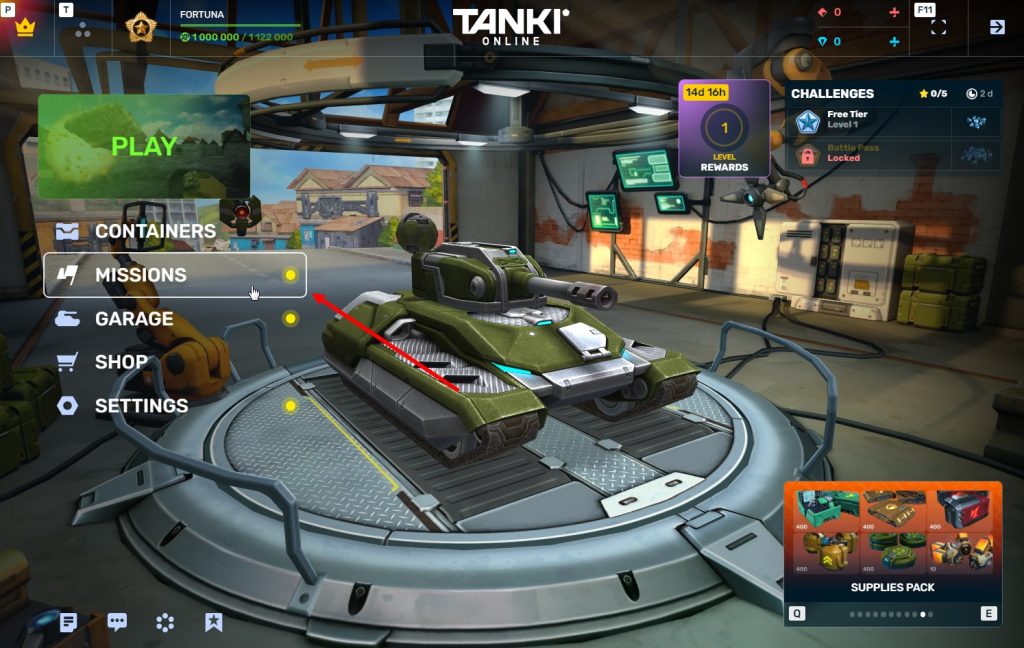
STEP 2 You need to enter the game and go to the Missions menu.
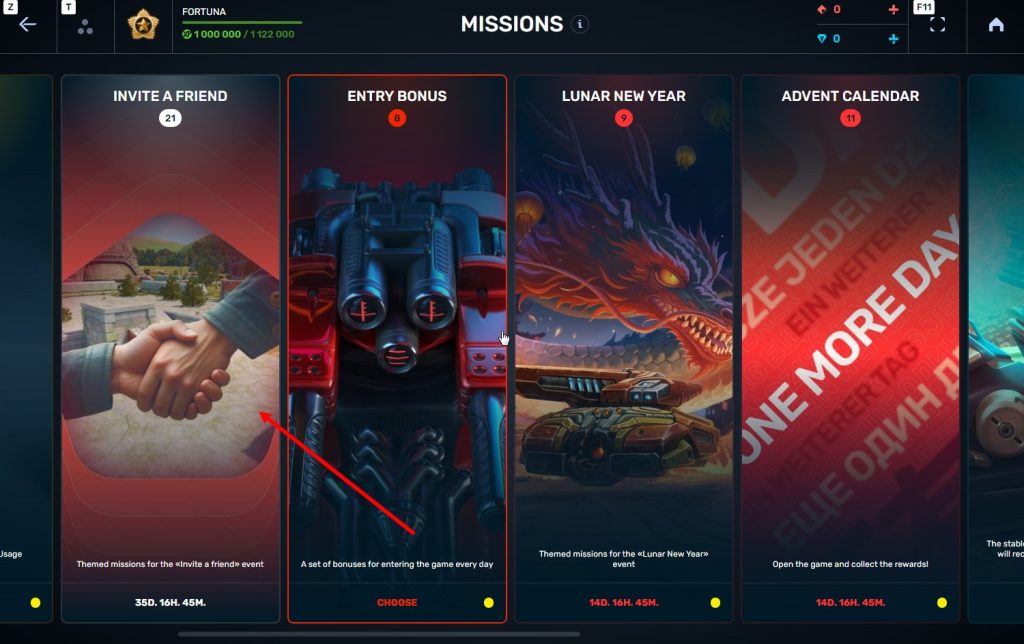
STEP 3 There, you need to open the special «Invite a friend» category of missions.
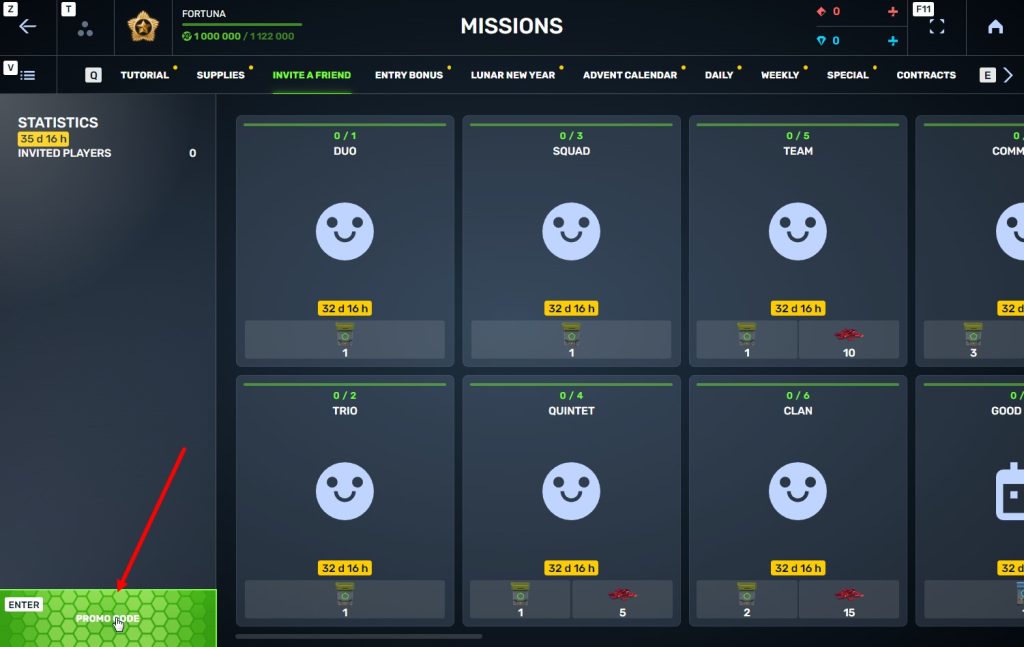
STEP 4 In that section, you need to generate a special invite promo code.
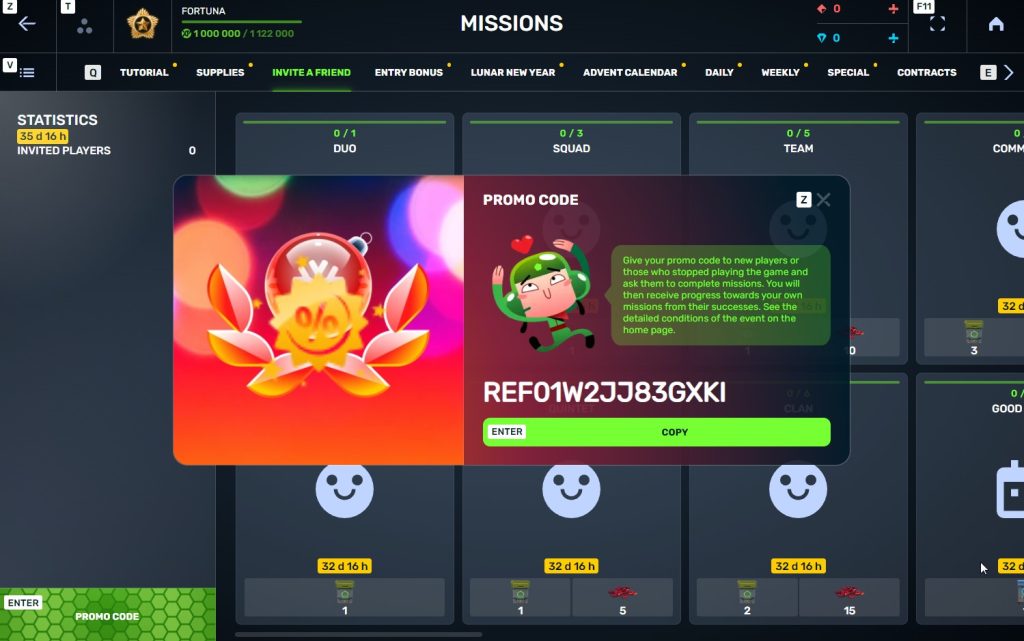
STEP 5 Share this Promocode with people you want to invite to the game and tell them how they can activate it (read below).
IMPORTANT: If you are a player who was invited to the game during this referral event, you cannot generate your own promo code to invite other players.
Who can become your referral
There are two types of players who can become your referrals:
- Players who created their account since July 10th 2 AM.
- Player who last entered the game before June 3rd 2 AM UTC.
Pay attention to the fact that in order to activate an invite promo code, a player should have at least Private rank.
Important: A player who generated a promo code to send it to other players cannot activate their own promo code or a Promocode of any other player.
What do I get for inviting players?
- Once you generate your invite promo code, send it to your friends and acquaintances.
- In the special «Invite a friend» category of missions, you will get a set of special missions.
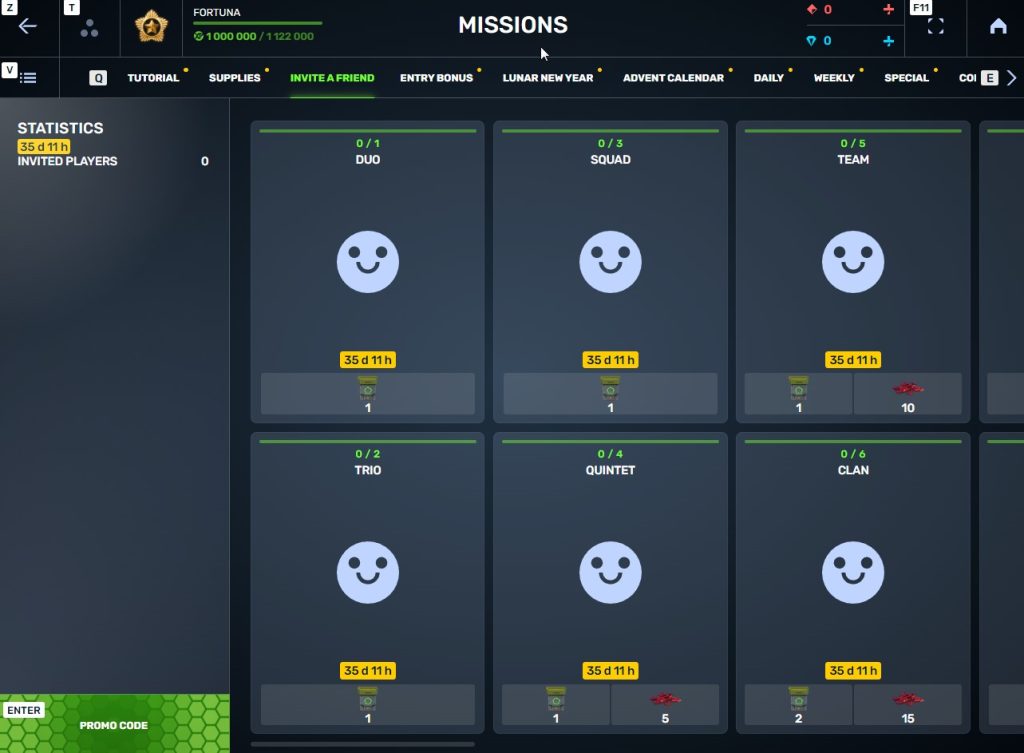
3. Once they activate your promo code, players who have been invited will also get a set of their own special missions in the «Missions from a friend» category. In your «Invite a friend» category you can track how your referrals complete their missions, and thus your missions get completed and you can claim rewards for the efforts of the players you have referred.
Missions for those who invite
There are two types of missions for inviting players. The first type gives you rewards for players who just activated your promo code. The second type gives you rewards once your invited players complete the required missions.
Bonuses for inviting players
Important: An invited player is counted towards mission progress only once they activate your promocode.
Duo
TASK
Invite 1 player to the game.
REWARD
×1
COMMON KEY
COMMON KEY
×100
EXPERIENCE POINTS
EXPERIENCE POINTS
Trio
TASK
Invite 2 players to the game.
REWARD
×1
COMMON KEY
COMMON KEY
×100
EXPERIENCE POINTS
EXPERIENCE POINTS
Squad
TASK
Invite 3 players to the game.
REWARD
×1
COMMON KEY
COMMON KEY
×100
EXPERIENCE POINTS
EXPERIENCE POINTS
Quintet
TASK
Invite 4 players to the game.
REWARD
×1
COMMON KEY
COMMON KEY
×100
EXPERIENCE POINTS
EXPERIENCE POINTS

×5
RUBY
RUBY
Team
TASK
Invite 5 players to the game.
REWARD
×1
COMMON KEY
COMMON KEY
×100
EXPERIENCE POINTS
EXPERIENCE POINTS
×10
RUBY
RUBY
Clan
TASK
Invite 6 players to the game.
REWARD
×2
COMMON KEY
COMMON KEY
×100
EXPERIENCE POINTS
EXPERIENCE POINTS
×15
RUBY
RUBY
Community
TASK
Invite 7 players to the game.
REWARD
×3
COMMON KEY
COMMON KEY
×100
EXPERIENCE POINTS
EXPERIENCE POINTS
×40
RUBY
RUBY
Bonuses for efforts of your referrals
Important: An invited player is counted towards mission progress only once they activate your promocode and complete the required referral missions.
Good Start
TASK
Invited players completed 10 referral event missions
REWARD
×1
RARE KEY
RARE KEY
×100
EXPERIENCE POINTS
EXPERIENCE POINTS
Makes Progress
TASK
Invited players completed 20 referral event missions
REWARD
×1
RARE KEY
RARE KEY
×100
EXPERIENCE POINTS
EXPERIENCE POINTS
Can Play Together
TASK
Invited players completed 30 referral event missions
REWARD
×1
RARE KEY
RARE KEY
×100
EXPERIENCE POINTS
EXPERIENCE POINTS
×5
RUBY
RUBY
They Trust You
TASK
Invited players completed 40 referral event missions
REWARD
×1
RARE KEY
RARE KEY
×100
EXPERIENCE POINTS
EXPERIENCE POINTS
×10
RUBY
RUBY
Social Butterfly
TASK
Invited players completed 50 referral event missions
REWARD
×1
RARE KEY
RARE KEY
×100
EXPERIENCE POINTS
EXPERIENCE POINTS
×15
RUBY
RUBY
Influencer
TASK
Invited players completed 60 referral event missions
REWARD
×2
RARE KEY
RARE KEY
×100
EXPERIENCE POINTS
EXPERIENCE POINTS
×20
RUBY
RUBY
Celebrity
TASK
Invited players completed 80 referral event missions
REWARD
×3
RARE KEY
RARE KEY
×100
EXPERIENCE POINTS
EXPERIENCE POINTS
×60
RUBY
RUBY
Full Pack
TASK
Invited players completed 1 referral event supermission
REWARD
×1
EPIC KEY
EPIC KEY
×100
EXPERIENCE POINTS
EXPERIENCE POINTS
Aspiring Expert
TASK
Invited players completed 2 referral event supermissions
REWARD
×1
EPIC KEY
EPIC KEY
×100
EXPERIENCE POINTS
EXPERIENCE POINTS
×5
RUBY
RUBY
Forward to Victory
TASK
Invited players completed 3 referral event supermissions
REWARD
×1
EPIC KEY
EPIC KEY
×100
EXPERIENCE POINTS
EXPERIENCE POINTS
×10
RUBY
RUBY
Good Mentor
TASK
Invited players completed 4 referral event supermissions
REWARD
×1
EPIC KEY
EPIC KEY
×100
EXPERIENCE POINTS
EXPERIENCE POINTS
×15
RUBY
RUBY
Thunderstorm of Matchmaking
TASK
Invited players completed 5 referral event supermissions
REWARD
×1
EPIC KEY
EPIC KEY
×100
EXPERIENCE POINTS
EXPERIENCE POINTS
×20
RUBY
RUBY
Preparing for eSports
TASK
Invited players completed 6 referral event supermissions
REWARD
×2
EPIC KEY
EPIC KEY
×100
EXPERIENCE POINTS
EXPERIENCE POINTS
×60
RUBY
RUBY
Professional Referrer
TASK
Invited players completed 7 referral event supermissions
REWARD
×3
EPIC KEY
EPIC KEY
×700
RUBY
RUBY
×1
LEGENDARY KEY
LEGENDARY KEY
How it works for referrals
Once you invite a friend and give them your promo code, your friend should do the following:
STEP 1 Create an account (or log into an existing one, if it meets the criteria)
STEP 2 Get the «Private» rank. It won’t take much time.
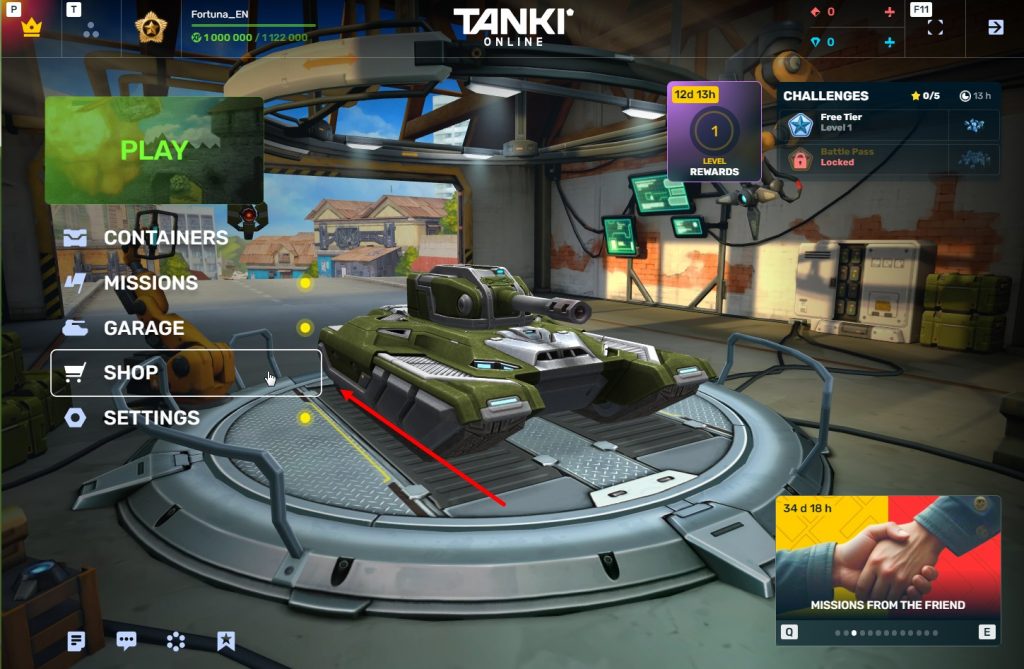
STEP 3 Enter the Shop
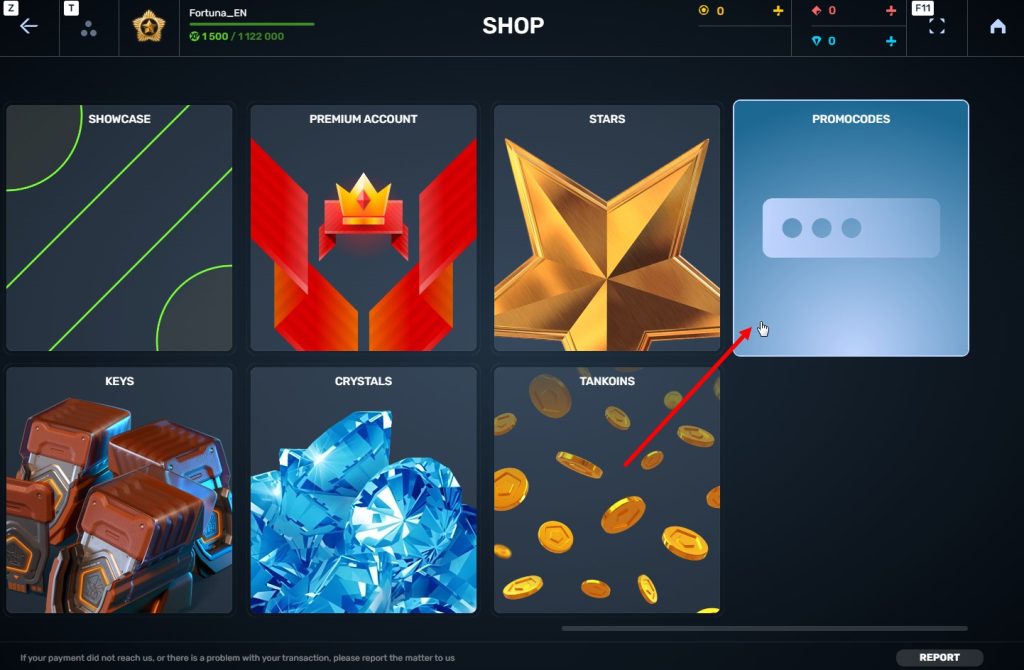
STEP 4 Go to the «Promocode» section
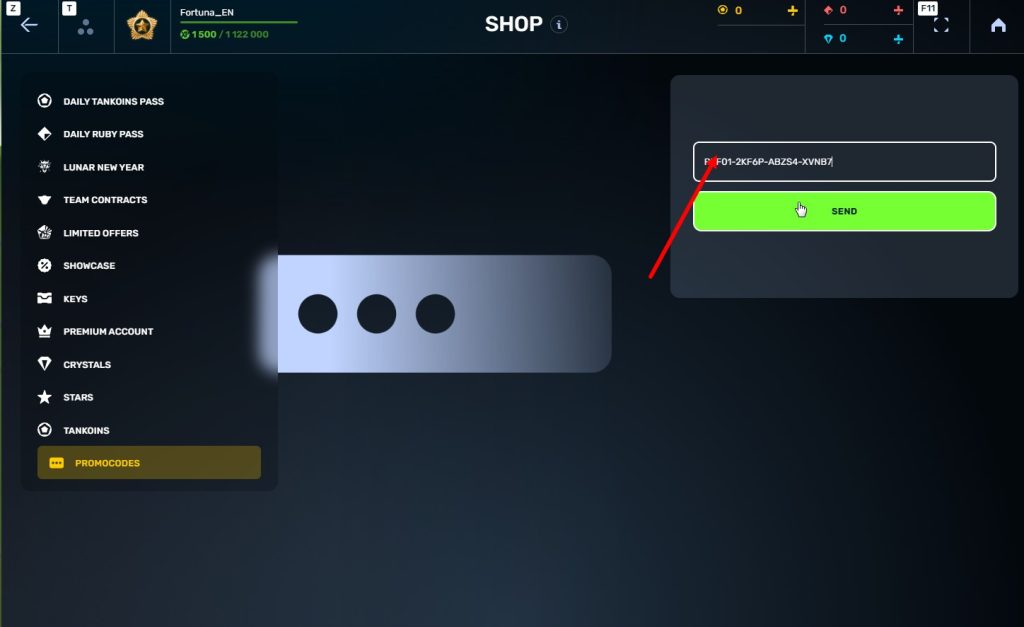
STEp 5 Activate the promo code
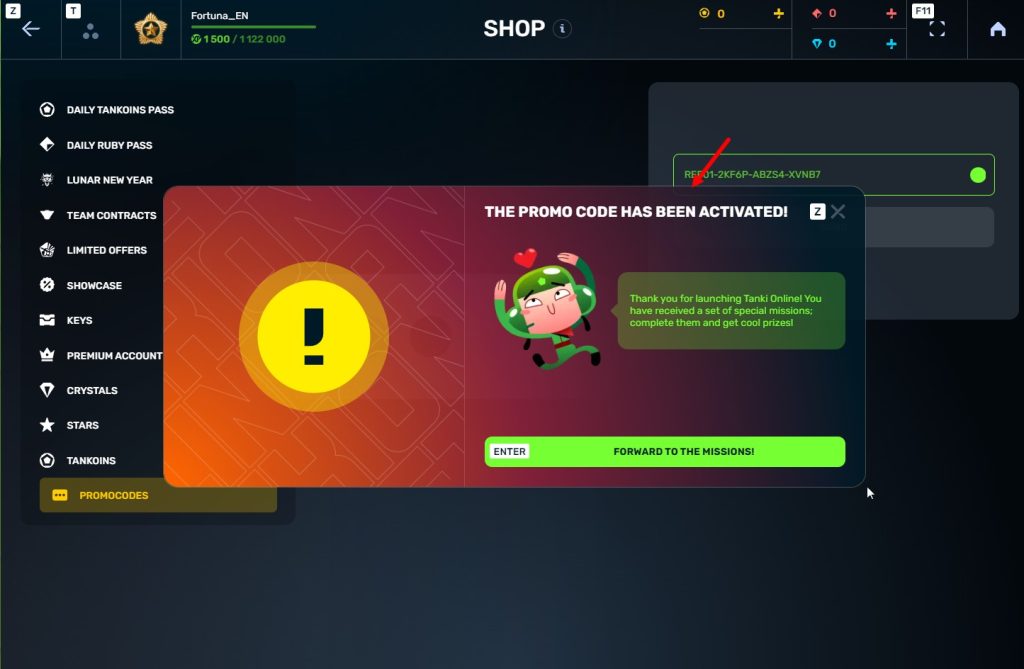
STEP 6 Press the «Forward to the missions!» button
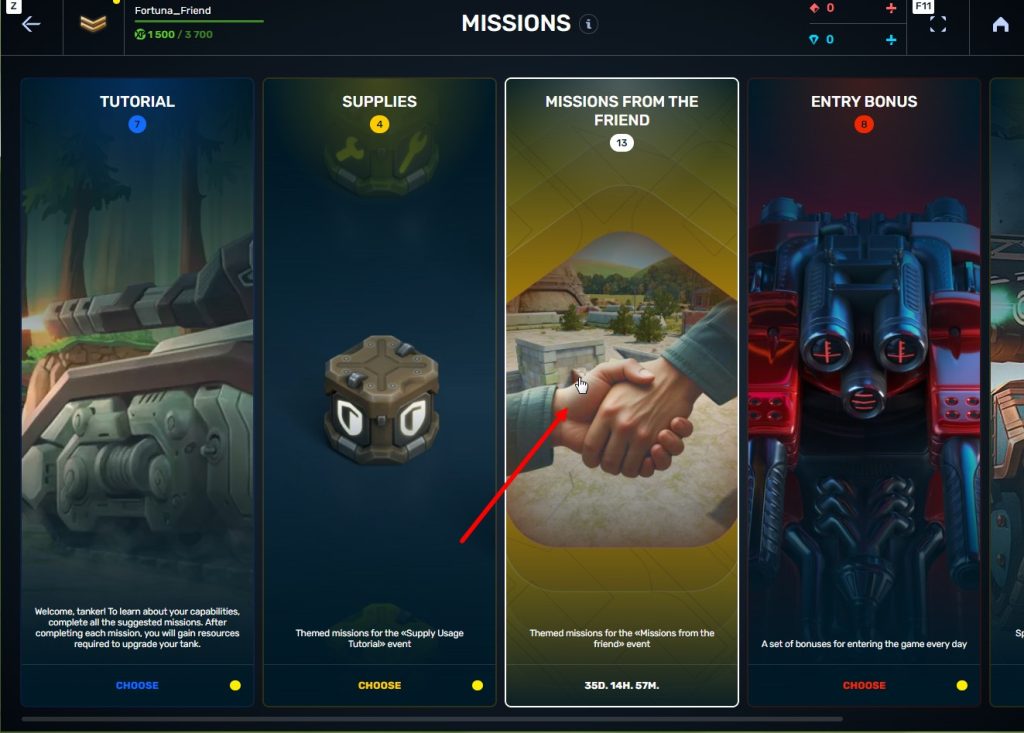
STEP 7 In the Missions menu, there will be a section called «Missions from the friend» with a set of special missions to complete
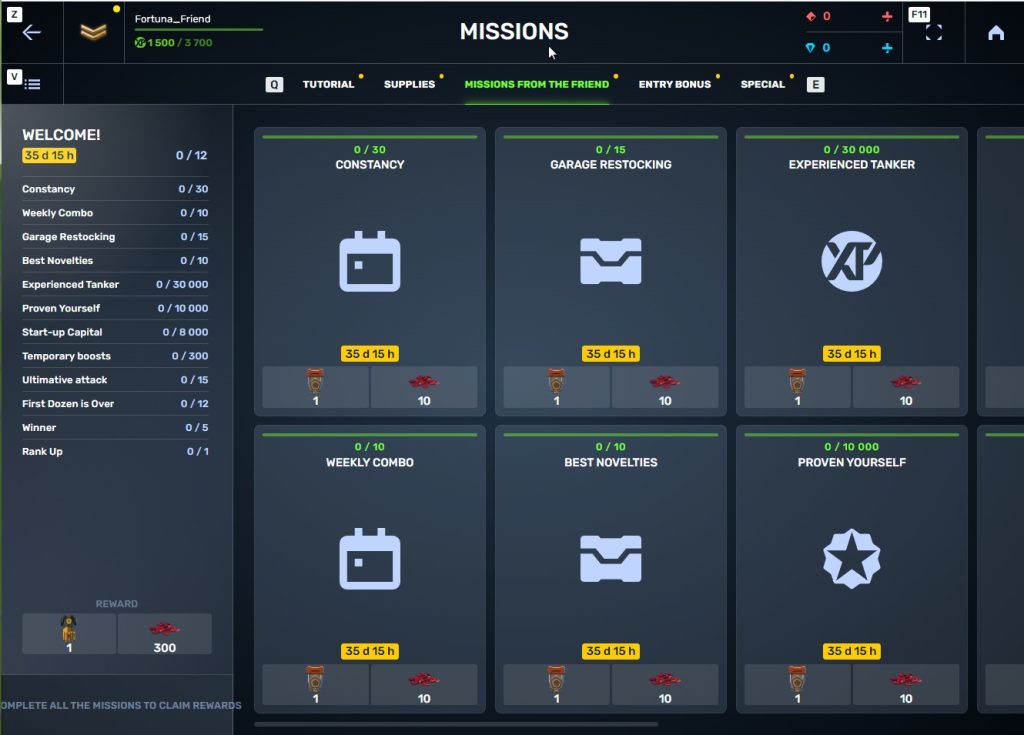
STEP 8 Complete the missions and claim the rewards
Important: During a referral event, a player can become a referral of only one player (activate only one referral promo code).
Bonuses for referrals for completing missions
WELCOME!
TASK
Supermission. Complete all referral missions.
REWARD
×1
legendary key
×300
ruby
CONSTANCY
TASK
Complete 30 daily missions.
REWARD

×1
epic key
×100
EXPERIENCE POINTS
EXPERIENCE POINTS
×10
ruby
WEEKLY COMBO
TASK
Complete 15 weekly missions.
REWARD
×1
epic key
×100
EXPERIENCE POINTS
EXPERIENCE POINTS
×10
ruby
GARAGE RESTOCKING
TASK
Open 15 Common Containers
REWARD
×1
epic key
×100
EXPERIENCE POINTS
EXPERIENCE POINTS
×10
ruby
BEST NOVELTIES
TASK
Open 10 Epic Containers.
REWARD
×1
epic key
×100
EXPERIENCE POINTS
EXPERIENCE POINTS
×10
ruby
EXPERIENCED TANKER
TASK
Earn 30 000 experience points.
REWARD
×1
epic key
×100
EXPERIENCE POINTS
EXPERIENCE POINTS
×10
ruby
PROVEN YOURSELF
TASK
Earn 15 000 reputation points.
REWARD
×1
epic key
×100
EXPERIENCE POINTS
EXPERIENCE POINTS
×10
ruby
START-UP CAPITAL
TASK
Earn 10 000 crystals.
REWARD
×1
epic key
×100
EXPERIENCE POINTS
EXPERIENCE POINTS
×10
ruby
TEMPORARY BOOSTS
TASK
Activate supplies 300 times.
REWARD
×1
epic key
×100
EXPERIENCE POINTS
EXPERIENCE POINTS
×10
ruby
ULTIMATIVE ATTACK
TASK
Use overdrive 15 times.
REWARD
×1
epic key
×100
EXPERIENCE POINTS
EXPERIENCE POINTS
×10
ruby
FIRST DOZEN IS OVER
TASK
Finish 20 battles.
REWARD
×1
epic key
×100
EXPERIENCE POINTS
EXPERIENCE POINTS
×10
ruby
WINNER
TASK
Be in the winning team of 5 battles.
REWARD
×1
epic key
×100
EXPERIENCE POINTS
EXPERIENCE POINTS
×10
ruby
RANK UP
TASK
Get a new rank.
REWARD
×1
epic key
×100
EXPERIENCE POINTS
EXPERIENCE POINTS
×10
ruby
You can track the progress of completing missions by your referrals in the «Statistics» column of the «Invite a friend» category in missions.
Invite friends and get rewards!
New English Instagram Account ‼️

Our old Instagram account was blocked due to reasons beyond our control.
So we’ve created a new page — and we’re waiting for you there!
We will be publishing some of the upcoming posts on our new Instagram account exclusively one hour earlier than anywhere else.
Event announcements, development news, exclusive content, game highlights, and much more — all in one place for you.
Follow us to stay updated on all the game news and events ❤️
Tanki Classic mass test

We are officially launching the “Tanki Classic” mass test!
During the test, you will be able to get onto separate “Tanki Classic” test servers, if you have purchased one of the early access special offers.
How to get there?
You can get onto “Tanki Classic” only through the announcement window in the main game lobby.
Attention! There are no other ways to get onto the game. Other sites you see on the Internet are scams and are made to steal your account details. You do not need to enter your password to log into the Tanki Classic test servers. If someone asks for your password to access Tanki Classic, it is definitely a scam. Be careful.
You will only have access if you are an early access participant.
How to get Early Access?
The special Early Access offers for “Tanki Classic” were only available for a limited time. With the start of the mass testing phase, we are bringing these special offers back on sale. This is your chance to become a part of the legendary “Tanki Classic” project ahead of everyone else!
Early Access offers are available from rank 8.
Personalized

×1000
(TO) Rubies

(TO) Bronze medal Tanki Classic

(TC) Nickname reservation
Nostalgia

×3000
(TO) Rubies

(TO) SILVER medal Tanki Classic
(TC) Nickname reservation

(TC) VETERAN PAINT

(TC) EARLY ACCESS

(TC) Voting option
Old School

×10000
(TO) Rubies

(TO) Gold medal Tanki Classic
(TC) Nickname reservation
(TC) VETERAN PAINT
(TC) EARLY ACCESS
(TC) Voting option

×200
(TC) CONTAINERS
What is there in the game?
This is a test version of the game. It is possible to encounter bugs, issues, unfinished features, and anomalies.
During the test, we will restart the game several times and even temporarily pause the testing process.
We will also wipe the test server database several times, which will reset all your progress.
For testing Tanki Classic, we use new server infrastructure. This may cause unstable server performance during the first weeks of testing. We will be configuring and fixing everything.
Is this early access already?
No. Early access will be announced separately, 2 weeks before the game is released. You will be able to get access to the game earlier than anybody else and progress your account earlier than others.
What is the “Development Plans” section on the Tanki Classic website?
Alongside the launch of Tanki Classic testing, we are adding a special “Development Plans” section to the project’s website. From now on, this section will be the primary, first-source of information on the development of the Tanki Classic project.
There, we will announce the key development areas of the project earlier than anywhere else.
Please note: the presented plans reflect our current goals and may be adjusted based on your feedback and voting results.
In the future, we will launch the promised polls for the game mechanics. You, the players, will define the future of “Tanki Classic!”
Feedback can be left on the forum topic of this news.
Recommended Posts